Scroll To Top

BSNL ADSL Modem Configuration: ZTE ZXDSL 831AII. brand new

₹799₹1,999

Product Sold Out

We will notify you when product is available

BSNL ADSL Modem Configuration: ZTE ZXDSL 831AII. brand new

BSNL ADSL Modem Configuration: ZTE ZXDSL 831AII. brand new Get best prices of BSNL ADSL Modem Configuration: ZTE ZXDSL 831AII. brand new on Shopclues.com Product Id : 81335976
₹799 MRP:₹1,999 60% off

Inclusive of all taxes

Get this for as low as: ₹784 How to earn CluesBucks+

English हिंदी

  • 1) Create account & Earn 500 CB+ instantly (New User)
  • 2) Get 100% Cashback as CB+ on all orders*
  • 3) Complete any COD order to earn CB/ CB+
  • 4) Win CB/CB+ as part of our Promotions.
Original Price
Applicable for All Users
Apply cluesbucks+
Deal Price
₹799
(  ₹15 ) 
₹784

*All discounts can be availed in the cart page

Extra CluesBucks+only on VIP Club. Join Now
Sold Out

This product is currently out of stock

  • Easy Returns & Replacement

    If applicable customer can place a return/replacement request within 10 Days of order delivery.

    In case of damaged/missing/wrong product or empty parcel, the return/replacement request should be placed within 2 days of delivery.

    Know More
  • Payment Options: (Credit Card , Debit Card , Net Banking , Wallets )
Sold by :

GUPTA G

kotkapura , Punjab

2.7 (64) Reviews
Visit Seller Store
Product Details:

BSNL ADSL Modem Configuration: ZTE ZXDSL 831AII. brand new


This guide will brief you about ZTE ZXDSL 831AII (Type-1). It will guide you about how to physically connect modem as well as firmware configuration of this modem pictorially. It is a easy and step-by-step guide for you.


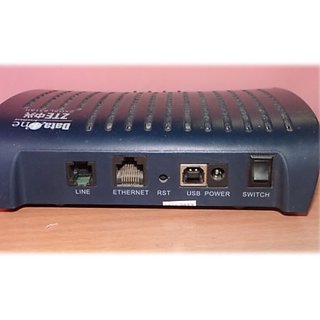
You have chosen ZTE modem (Model: ZTE ZXDSL 831AII). The ZTE ZXDSL 831AII provideshigh-speed Internet access via one LAN port over ATM over ADSL, and also connects to the corporate network via a 10/100 BaseT Ethernet port. It is a type-1 modem in context to BSNL modem terminology. It has one Ethernet port and one USB port for PC connectivity (No Wi-Fi).

Front Panel:

ZTE-ZXDSL-831AII-Front

Rear Panel:

ZTE-ZXDSL-831AII-Back

Hardware Connection:

ZTE-ZXDSL-831AII-connection

LED Status:

ZTE-ZXDSL-831AII-LED

I will discuss the bridge configuration (i.e dialer mode) for this modem pictorially with required text when needed. I will break the whole modem configuration procedure in two sections.

Section I:

LAN Configuration:

              Put the IP address in Local Area Connection as-
IP Add: 192.168.1.11 (Say)
Subnet Mask: 255.255.255.0
Default Gateway: 192.168.1.1
ITI-DNA-A211-I-Modem-6

Section II:

Step 1: Open Internet Explorer or other browser, and put 192.168.1.1 in address bar of browser and hit enter. One window of modem configuration will open, put the user name and password as-
User Name: admin
Password: admin

ZTE-ZXDSL-831AII-Login

Step 2:  After providing user name and password, you will come to the home page of modem. Click on Configuration -> internet, the following window appears:

More Details

Maximum Retail Price (inclusive of all taxes) Rs.1999
Common or Generic Name -
Net Contents / Net Quantity -
Manufacturer's Name and Address -
Packer's Name and Address -
Marketer's name and Address -
Importer's Name and Address -
Country of Origin / Manufacture / Assembly India
Service Center Locator Click Here

Rating & Reviews

0
5
0
4
0
3
0
2
0
1
0

0 Ratings, 0 Reviews

Please Note: Seller assumes all responsibility for the products listed and sold . If you want to report an intellectual property right violation of this product, please click here.
Some text some message..