Product Sold Out
Inclusive of all taxes
English हिंदी
| Original Price |
|
Deal Price | ||
|---|---|---|---|---|
| ₹349 |
|
₹343 |
*All discounts can be availed in the cart page
This product is currently out of stock
If applicable customer can place a return/replacement request within 10 Days of order delivery.
In case of damaged/missing/wrong product or empty parcel, the return/replacement request should be placed within 2 days of delivery.
Know More PRODUCT DESCRIPTION
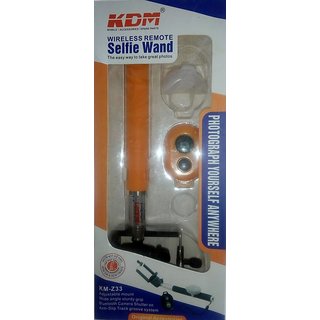
Highlights
Material: Stainless Steel & ABS Plastic
See Instructions- Bluetooth/Aux Cable compatible with iOS & Andriod 4.3+, for other versions Change phone settings or download camera 360 Ultimate App from Google Play Store
Extendible Length: 97 cm Appox
Foldable Length: 20 cm Approx
Universal Attached Screw
Non-Slip Foam Grip
Compatible with all Android & Apple smartphones
SUPC: SDL716402341
Description
It is very easy to connect this Selfie Stick having Bluetooth. This selfie stick is compatible with all the iOS versions. You can use it with your Apple iPhones without having to make any manual adjustments. Just connect you device and click endless pictures. If you are an Android phone user and have 4.3 & above version installed on your device, the Bluetooth remote will successfully connect and function with your smartphone. For Android Versions less than 4.3 On smartphones having Android version less than 4.3, Bluetooth remote control is not configured to click photos using the side volume buttons. You will have to make changes in your phone settings to be able to use the selfie stick with Bluetooth remote. Alternatively, you can install Camera 360 Ultimate App from Google Play to be able to use the Bluetooth Remote with your device. Change Phone Settings Following are the steps that need to be followed for creating optimum settings on your smartphone to make the Bluetooth Remote successfully function with your mobile: Step 1: Open Camera Application on your Smartphone Remote/Shutter with your smartphone. Depending upon the type of mobile phone you own, the settings can be adjusted for using the Bluetooth/Aux Cable connectivity option along with your device. For all iOS Versions & 4.3+ Android Smartphones. Step 2: Tap on the Gear/Settings Icon Step 3: Click on the Volume Key Step 4: Choose Volume Key as ‘Camera Key’ to click pictures. Install Camera 360 Ultimate App from Google Play If you do not find the camera on your smartphone compatible with the above settings, there is an alternative available. You can install Camera 360 Ultimate App from Google Play store and use the selfie stick with Bluetooth remote. This app can be downloaded free of cost and work with any device. Important Note Please Note Every Product Is Tested Before Shipping. Please Do Leave Feedback's To Know How To Serve You Better. Please For Any Quires About The Product Purchased Or Going To Purchase Do Call Or Message Us Before Leaving A Negative Feedback. We ship the product on same day after receiving your order no For any other query please contact our customer care no. COLOR IS PER AVALIBILITY............
More Details |
|
| Maximum Retail Price (inclusive of all taxes) | Rs.999 |
| Common or Generic Name | - |
| Net Contents / Net Quantity | - |
| Manufacturer's Name and Address | - |
| Packer's Name and Address | - |
| Marketer's name and Address | - |
| Importer's Name and Address | - |
| Country of Origin / Manufacture / Assembly | China |