Product Sold Out
Inclusive of all taxes
English हिंदी
| Original Price |
|
Deal Price | ||||
|---|---|---|---|---|---|---|
| ₹1,699 |
|
₹1,499 | ||||
*All discounts can be availed in the cart page
Get flat 10 Percent off on all Prepaid Orders
Use Code "MYSHOPCLUES" Min. Cart Value ₹149 | Max. Discount ₹1000 T&CThis product is currently out of stock
If applicable customer can place a return/replacement request within 10 Days of order delivery.
In case of damaged/missing/wrong product or empty parcel, the return/replacement request should be placed within 2 days of delivery.
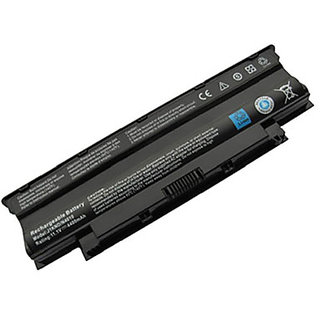
Know MoreThis Lapguard replacement Battery is made from High grade cells and highest quality parts. This Lapguard brand replacement battery is 100% comparable to Original battery in all terms including its size, appearance and most important QUALITY. Each Lapguard Laptop Battery has to pass strict quality control procedures including filtration and safety testing of voltage, capacity and battery core (body). Each battery also passes necessary authentication certifications like CE, ROHS etc. before leaving the factory, so you can be rest assured for its quality, durability and performance
Please read before ordering:-
1. Please match picture of your battery at the time of order (size, shape, connector position). If model matches and picture doesn’t, please ask us before order.
2. Images of batteries are given to match size, shape and connector position, not stickers on battery, battery shall have different sticker.
Battery Replace The Following Part Number:
04YRJH, 07XFJJ, 312-0233, 312-0234, 383CW, 451-11510, 4T7JN, 965Y7, 9T48V, 9TCXN, FMHC10, J1KND, J4XDH, TKV2V,W7H3N, YXVK2
Battery Fit With Following Models:
Inspiron 13R, Inspiron 13R(3010-D330), Inspiron 13R(3010-D370HK), Inspiron 13R(3010-D430), Inspiron 13R(3010-D460HK), Inspiron 13R(3010-D520), Inspiron 13R(N3010), Inspiron 13R(N3010D-148), Inspiron 13R(N3010D-168), Inspiron 13R(N3010D-178), Inspiron 13R(N3010D-248), Inspiron 13R(N3010D-268), Inspiron 13R(T510431TW), Inspiron 13R(T510432TW), Inspiron 13R(3010-D370TW), Inspiron 13R(3010-D381), Inspiron 13R(3010-D460TW), Inspiron 13R(3010-D480), Inspiron 13R(3010-D621), Inspiron 13R(Ins13RD-348), Inspiron 13R(Ins13RD-448), Inspiron 13R(Ins13RD-448LR), Inspiron 14R, Inspiron 14R(4010-D330), Inspiron 14R(4010-D370HK), Inspiron 14R(4010-D381),Inspiron 14R(4010-D382), Inspiron 14R(4010-D430), Inspiron 14R(4010-D460HK), Inspiron 14R(4010-D480), Inspiron 14R(4010-D520), Inspiron 14R(Ins14RD-438), Inspiron 14R(Ins14RD-448B), Inspiron 14R(Ins14RD-458), Inspiron 14R(N4010), Inspiron 14R(N4010D-248), Inspiron 14R(N4010D-258), Inspiron 14R(T510401TW), Inspiron 14R(T510402TW), Inspiron 14R(T510403TW), Inspiron 14R(4010-D370TW), Inspiron 14R(4010-D460TW), Inspiron 15R, Inspiron 15R(5010-D330), Inspiron 15R(5010-D370HK), Inspiron 15R(5010-D382), Inspiron 15R(5010-D430), Inspiron 15R(5010-D460HK), Inspiron 15R(5010-D480), Inspiron 15R(5010-D481), Inspiron 15R(5010-D520), Inspiron 15R(N5010), Inspiron 15R(N5010D-258), Inspiron 15R(N5010D-278), Inspiron 15R(Ins15RD-458B), Inspiron 15R(Ins15RD-488), Inspiron 17R, Inspiron 17R(N7010), Inspiron M501, Inspiron M501R, Inspiron N3010, Inspiron N4010, Inspiron N4010-148, Inspiron N4010D-158, Inspiron N5010, Inspiron N5010D-148, Inspiron N5010D-168, Inspiron N7010, Vostro 1440, Vostro 1450, Vostro 1540, Vostro 1550, Vostro 3450, Vostro 3550, Vostro 3750, Inspiron M5030, Inspiron M5030D, Inspiron M5030R, Inspiron13R(Ins13RD-438)
Warranty Terms & Conditions: - Battery carries 12 Months Seller Warranty in case of Non- Performance or Defect. Buyer has to send battery back to seller at his own expenses for replacement / refund. Warranty Stickers and signs should remain on battery. Warranty voids if there is any physical damage.
Good Tips for Getting Maximum Shelf Life for Your Battery:
Your new laptop battery comes in a discharged condition and must be charged before use (refer to your computer manual for charging instructions). Upon initial use (or after a prolonged storage period) the battery may require two to three charge/discharge cycles before achieving maximum capacity.
When charging laptop battery for the first time your computer may indicate that charging is complete after just 10 or 15 minutes. This is a normal phenomenon with rechargeable batteries. Simply remove the battery from the computer and repeat the charging procedure.
It is important to condition (fully discharge and then fully charge) laptop battery every two to three weeks. Failure to do so may significantly shorten the battery's life (this does not apply to Li-Ion laptop batteries, which do not require conditioning). To discharge, simply run your device under the battery's power until it shuts down or until you get a low battery warning. Then recharge the battery as instructed in your user's manual.
If laptop battery will not be in use for a month or longer, it is recommended that it be removed from the device and stored in a cool, dry, clean place. It is normal for replacement laptop battery to become warm during charging and discharging.
Key Feature | |
| Model ID | : Dell 1525 |
| Part Number | : Dell 1525 |
More Details |
|
| Maximum Retail Price (inclusive of all taxes) | Rs.3999 |
| Common or Generic Name | - |
| Net Contents / Net Quantity | - |
| Manufacturer's Name and Address | - |
| Packer's Name and Address | - |
| Marketer's name and Address | - |
| Importer's Name and Address | - |
| Country of Origin / Manufacture / Assembly | China |